Mount Lofty Botanic Garden App
A mobile companion app concept built from two years of on-site observation, replacing scattered trail info with a simple way to choose a walk, find highlights, and navigate the garden.
Mount Lofty Botanic Garden App
Choose a walk, find highlights, and follow the loop.
MLBG-APP-2025
THE GOAL
Help the garden make each walk easier to understand by improving route clarity, wayfinding, and access to key visitor information.
Help visitors choose the right trail based on what they want to experience—whether that’s clearer paths, specific flora, or unique wildlife sightings.
Success signals
Clearer route understanding, less confusion at path intersections, and more intentional trail choices based on visitor interests.
SCOPE
I led the project end to end: defining the concept, shaping the content and information architecture, designing the key user flows, and building the UI system and interactive prototype in Figma.
As a self-initiated project, I did not work with developers or stakeholders, and the scope stopped at prototype level rather than live implementation.
THE PROBLEM
Over two years of weekly visits to Mount Lofty Botanic Garden, the same pattern repeated at every trail intersection: other visitors stopping to ask if they were on the right path.
The signage wasn't clear enough, the routes were hard to compare, and there was no simple way to choose a walk based on what you actually wanted to see.
This app started as a personal response to that problem.
User sentiment:
Confusion at path intersections.
Uncertainty about what each walk includes.
Frustration caused by scattered information.
CONSTRAINTS
Because this was a self-initiated concept, the design had to work within real limitations around access, data, scope, and outdoor usability.
These constraints helped define a simpler, more focused MVP built around clarity, route choice, and confidence on the walk.
RESEARCH APPROACH
To ground the concept in real visitor needs, I combined desk research with repeated on-site observation and lightweight UX synthesis.
The goal was to understand how people choose a walk, where wayfinding becomes confusing, and what information they need before and during the visit.
Methods
Participants
First-time visitors and returning locals.
Key research questions
How do visitors currently choose a walk?
How can trail choice be shaped by experience, not just distance or difficulty?
Where does wayfinding become unclear or stressful?
Key findings
Visitors need clearer route expectations before they start walking.
Trail selection becomes easier when each walk is explained by what it offers, not only by length or difficulty.
Confusion increases at path intersections where the next step is not obvious.
Observation pain-point map
A simplified route diagram highlighting where visitors hesitate, compare options, or lose confidence at key decision points.
01
Pain Point:
Visitors need route expectations before the walk starts, not only after choosing a path.
02
Pain Point:
Visitors pause here to compare routes and decide what each walk actually offers.
03
Pain Point:
Signage and route names do not make the next step obvious enough at a glance.

Affinity map
Research signals grouped into recurring themes to surface patterns around wayfinding, route choice, and visitor confidence.

SYNTHESIS OUTPUTS
Visitor types
Two lightweight proto-personas representing the main visitor modes this concept was designed around.
First-time Visitor
Primary motivation: choose a suitable walk with confidence before starting.
Occasional day-trip visitor
Need clarity before the walk starts
Motivation
· Choose a suitable walk without second-guessing.
· Understand what each trail offers before starting.
· Avoid getting lost at intersections.
Needs
· Clear walk summaries.
· Visible route difficulty and facilities.
· Simple map guidance.
Frustrations
· Trail information feels scattered.
· Route differences are hard to compare quickly.
· Signage does not always make the next step obvious.

Returning Local
Primary motivation: explore the garden differently and choose walks more intentionally.
Weekend regular
Wants a more intentional repeat experience
Motivation
· Explore the garden differently each visit.
· Pick walks based on flora, fauna, or season.
· Use the route with more confidence and less friction.
Needs
· Experience-based trail filters.
· Seasonal highlights.
· Light in-route discovery cues.
Frustrations
· Current information does not highlight unique route experiences.
· Repeated visits can feel less guided than they should.
· Wildlife and plant-based discovery is not surfaced clearly.
Information architecture
A proposed app structure organised around what visitors need before, during, and around the walk.
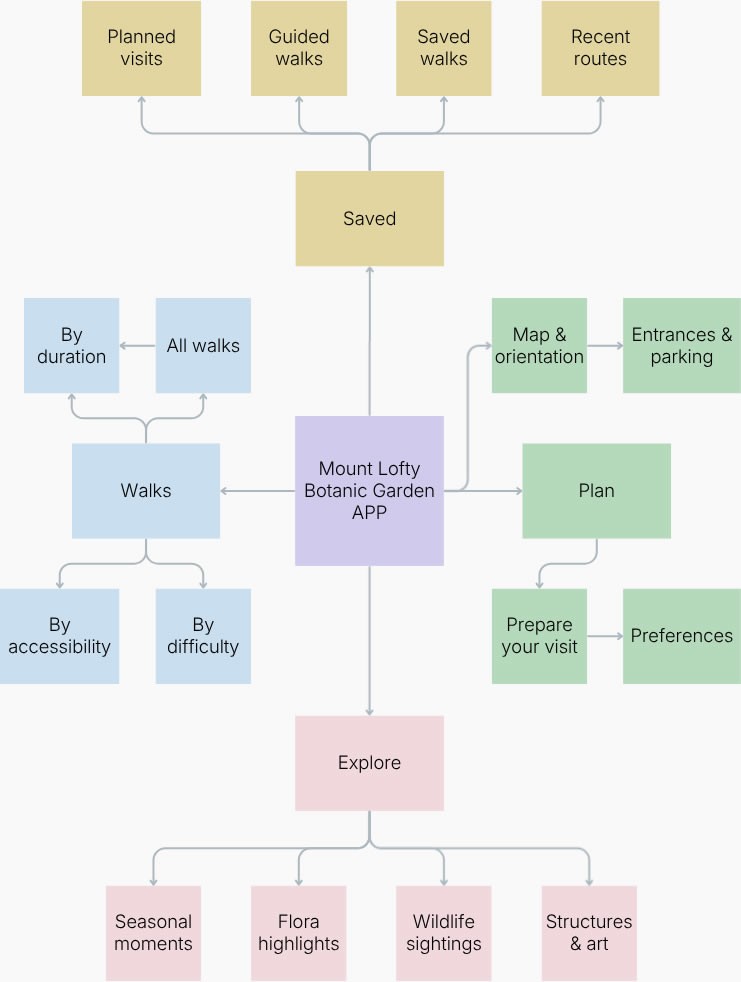
Structure principle: visitors choose a walk by experience.
Navigation is split between before-the-walk planning and during-the-walk support.
These findings directly informed the trail cards, experience-based filtering, and in-route guidance explored in the final prototype.
THE SOLUTION
The app was designed to make walk selection clearer before the visit and orientation easier during it. The experience is organised around trail discovery, route comparison, lightweight guidance, and saved planning.
Core logic
A simplified product logic that frames the app around discovery, comparison, and confidence on the walk.
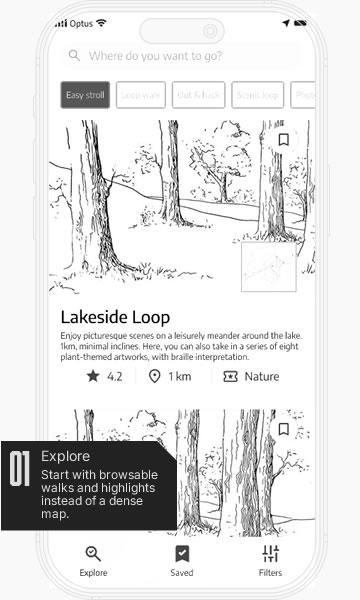


Main design decisions
This flow focuses on the core visitor journey: understanding the options, choosing with more confidence, and staying oriented once the walk begins.

Key screens annotated
Six screens show how the concept moves from discovery to route planning, guidance, and saved visits.


The final concept prioritises clarity over feature overload, helping visitors choose better, navigate more confidently, and get more out of each walk.
UI DESIGN
The interface was designed to feel calm, immersive, and easy to scan. I built a lightweight system that balances botanical atmosphere with practical wayfinding, using clear hierarchy, reusable components, and a mobile-first structure.
Design tokens
The visual foundation combines colour, spacing, and brand expression to create a calm, recognisable interface with consistent hierarchy and a clear sense of place.

Typography
Typography was used to balance character and readability. Large condensed headings bring personality and presence, while simpler body styles keep route information, filters, and supporting content easier to read.

UI kit
Forms and icons were designed to keep interactions simple, scannable, and easy to understand across search, filtering, navigation, and route details.

Buttons
The button system includes primary, secondary, icon, and utility actions, giving the interface enough flexibility to support both decision-making and lightweight interaction.

Molecules
Small UI combinations such as route stats, filter groups, tab bars, and metadata clusters were built as reusable patterns to speed up assembly and keep the experience consistent.

Organisms
At a larger level, the system brings together imagery, route information, map previews, and supporting content into more complete modules that feel immersive without losing clarity.

Maps
Map components were simplified into readable layers that combine loops, landmarks, facilities, and points of interest, helping visitors stay oriented without overwhelming them with detail.

Together, these UI decisions turned the concept into a system that feels both exploratory and structured — closer to a real product than a set of isolated screens.
OUTCOME
A fully navigable prototype covering the core visitor journey: route discovery, comparison, saving, and lightweight wayfinding.
Key design decisions
Bottom navigation reduced from five tabs to three — Explore, Saved, and Filters — keeping focus on the actions that matter during a garden visit.
Filters moved from a hidden icon inside search to a dedicated main tab, reflecting how central route filtering is to the walk selection decision.
A user ratings feature was designed but intentionally excluded to keep the MVP focused on the core problem.
Iteration
Before finalising the prototype, I shared it with my wife and a small group of friends for informal usability feedback. Four changes came directly from that session:
How success would be measured
Task completion rate for walk selection. Time to choose a route. Return visits tracked through saved routes activity.
Learnings
Two years of weekly visits gave the research a depth a single site visit never could.
Structure changes have more impact than visual ones, moving filters to the main tab changed the entire feel of the app.
Personal familiarity made scope decisions easier to defend. Knowing the garden made it obvious what belonged in the MVP.
Mount Lofty Botanic Garden App
Choose a walk, find highlights, and follow the loop.
MLBG-APP-2025